Spring for POJAs (Plain old java applications) - Revisited
by AlphaGeek
Thu, Oct 25, 2018
Back in the distant past, I wrote this article showing how to use spring to initialize a command line application. I used this technique often to create command line tools that could make use of many of the java components I built for web applications and other J2EE deployments. Now if you want to use Spring Framework in your applications you have many more options. I will start with something that is largely similar to what I presented in my 2006 article.
CommandLineRunner
Command.java
package com.computersfearme.spring.poja;

import org.slf4j.Logger;
import org.slf4j.LoggerFactory;
import org.springframework.boot.ExitCodeGenerator;
import org.springframework.stereotype.Component;

import java.util.Arrays;

@Component
public class Command implements ExitCodeGenerator {
    private static final Logger logger = LoggerFactory.getLogger(Command.class);

    private int exitCode = 1;

    public Command() {
    }

    public void run(String... args) {
        logger.info("Running {}", Arrays.toString(args));
        exitCode = 0;
    }

    @Override
    public int getExitCode() {
        return exitCode;
    }
}
This class is a placeholder for the functionality of your command. You can name it whatever you want, and if you care
about what the exit code for the command will be you can implement ExitCodeGenerator and return whatever value is
appropriate, otherwise the command will always return 0.
SpringPoja1Application.java
package com.computersfearme.spring.poja;

import org.slf4j.Logger;
import org.slf4j.LoggerFactory;
import org.springframework.beans.factory.annotation.Autowired;
import org.springframework.boot.CommandLineRunner;
import org.springframework.boot.SpringApplication;
import org.springframework.boot.autoconfigure.SpringBootApplication;
import org.springframework.context.ApplicationContext;

@SpringBootApplication
public class SpringPoja1Application implements CommandLineRunner {
    private static final Logger logger = LoggerFactory.getLogger(SpringPoja1Application.class);
    private final Command command;

    @Autowired
    public SpringPoja1Application(Command command) {
        this.command = command;
    }

    @Override
    public void run(String... args) throws Exception {
        command.run(args);
    }

    public static void main(String[] args) {
        logger.info("Starting...");
        int exitCode = 1;
        try {
            ApplicationContext applicationContext = SpringApplication.run(SpringPoja1Application.class, args);
            exitCode = SpringApplication.exit(applicationContext);
        } catch(Exception ex) {
            logger.error("error running command:", ex);
        } finally {
            logger.info("Done");
        }
        System.exit(exitCode);
    }
}
This is a bit of code to get things bootstrapped and propagate any exit code while exiting. Command is injected into
the application object and called in the run(String... args) are called. The main method is a little different from
the default that you get from Spring Intializr. First, if any error occurs, the exit code
will be ‘1’. Second, the call to SpringApplication.exit triggers the processing of the ExitCodeGenerators.
You will probably want to either suppress the banner or replace it with something of your design. That can be done by
switching to a SpringApplicationBuilder (See below, the Spring Shell example uses this technique.).
Spring Shell
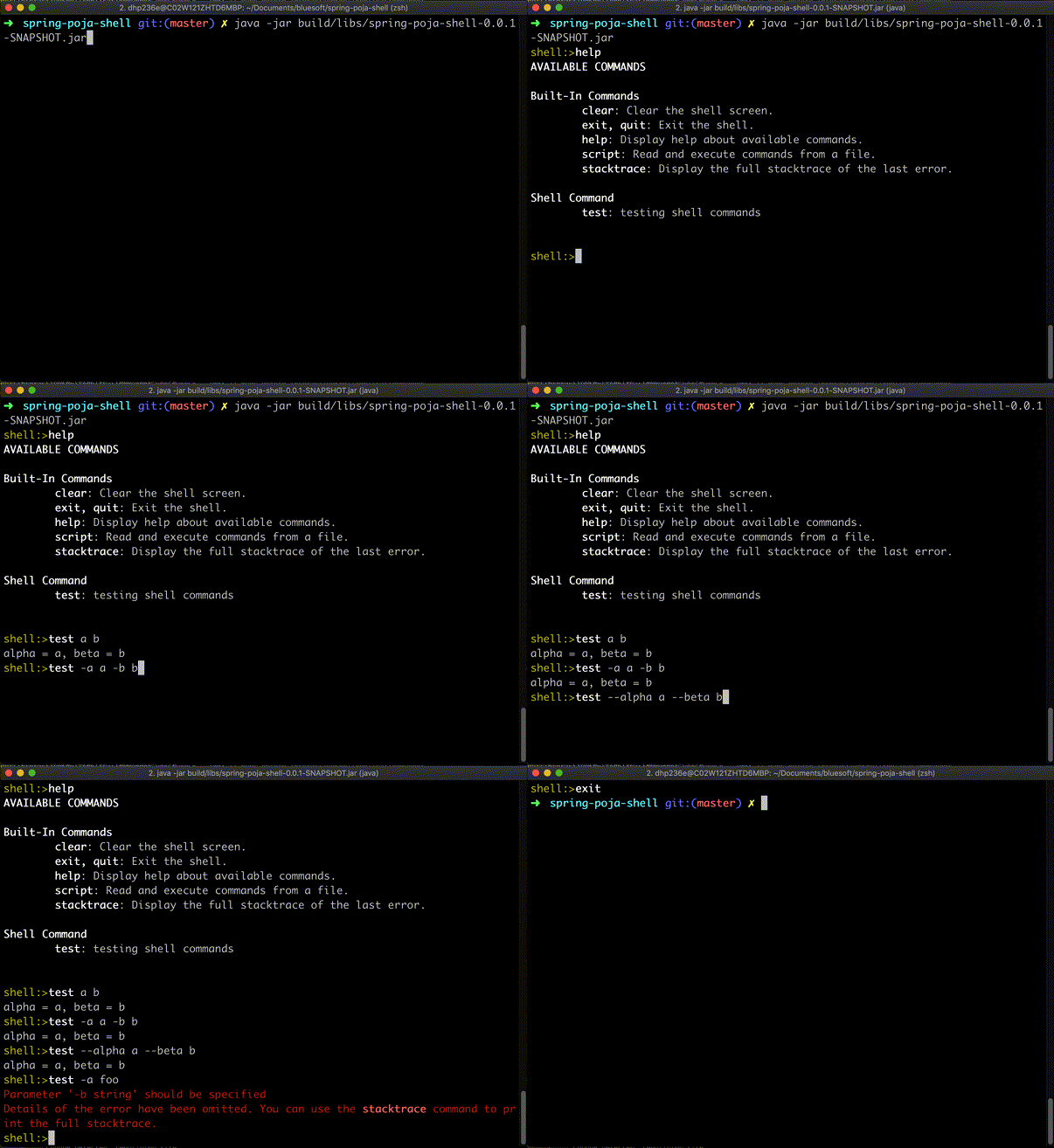
Spring Shell takes a different approach. This project provides a spring
configured application shell that a user can interact with. You could create applications like
Cassandra’s cqlsh. The idea is that you create methods that are invoked when their
“key” is used in the shell and the arguments are passed in from the command line:
Here is the code that does this:
SpringPojaShellApplication.java
package com.computersfearme.spring.poja.shell;

import org.springframework.boot.Banner;
import org.springframework.boot.WebApplicationType;
import org.springframework.boot.autoconfigure.SpringBootApplication;
import org.springframework.boot.builder.SpringApplicationBuilder;

@SpringBootApplication
public class SpringPojaShellApplication {

	public static void main(String[] args) {
		new SpringApplicationBuilder(SpringPojaShellApplication.class)
			.bannerMode(Banner.Mode.LOG)
			.web(WebApplicationType.NONE)
			.build()
			.run(args);
	}
}
This is very simple. it uses the SpringApplciationBuilder to construct a SpringApplication and then run it with the
program’s command line arguments. As you can see, we are sending the banner to the LOG and we are turning off any web
features. The default ApplicationRunner, ScriptShellApplicationRunner, will look for arguments that start with ‘@’
and interpret the remainder of the string as a script file name and attempt to run the script.
ShellCommand.java
package com.computersfearme.spring.poja.shell;

import org.slf4j.Logger;
import org.slf4j.LoggerFactory;
import org.springframework.shell.standard.ShellComponent;
import org.springframework.shell.standard.ShellMethod;
import org.springframework.shell.standard.ShellOption;

@ShellComponent
public class ShellCommand {
    private static final Logger logger = LoggerFactory.getLogger(ShellCommand.class);

    @ShellMethod("testing shell commands")
    public String test(@ShellOption({"-a", "--alpha"}) String a,
                       @ShellOption({"-b", "--beta"}) String b) {
        return String.format("alpha = %s, beta = %s", a, b);
    }
}
This is the “test” command that you saw in the screencast above. All it does is take it two arguments, format a string
using them and outputs that string. @Shell... annotations allow you to customize the behavior of the command’s input.
Of course, you can add all kinds of good stuff. You can inject any components in the context.
One problem is that there is no way to specify a command on the command line and have the shell application execute the command and exit. This seems like a very common pattern I have seen in programs that can present REPLs and it was present in the 1.x versions of the project. I may spend some time figuring out a solution for this and, if I do, I will it up on this blog.
TL;DR
The Spring Boot framework provides a few different ways to create command line applications.
You can either use a CommandLineRunner to run logic after the application context is fully initialized or you can
create a REPL using @ShellComponent annotated classes. Either way, you get the full capability of the
Spring Framework to initialize and manage your application components.
You can include any other of the many Spring Projects or any other library that your use
case needs.